
New in the PlanHero Impact Plan: Collect Membership Dues
Managing members often means managing more than names, contact information, volunteer activities, and events. For many organizations, membership dues are an important part of keeping everything running.
That’s why the PlanHero Impact Plan now gives organizations the ability to collect and manage membership dues directly as part of their member management process.
Whether your organization charges annual dues, monthly dues, or a one-time lifetime membership fee, you can establish your dues policy in PlanHero and connect it to Stripe for payment processing.
What You Can Set Up
With dues collection enabled in your Impact Plan, you can customize your membership dues to fit the way your organization operates.
You can:
- Set the amount of your membership dues
- Choose monthly or annual dues
- Create a one-time lifetime membership
- Establish when memberships renew
- Add a grace period for payment
- Determine what happens when dues aren’t paid
- Connect dues collection with your member onboarding process
This makes dues collection especially useful for PTAs, PTOs, PTCs, booster organizations, service clubs, associations, chapters, community organizations, and other membership-based groups.
How to Set Up Dues Collection in PlanHero
If you're more of a visual learner, click here to skip down to our video tutorial.
Step 1: Open Your Impact Settings
When you log in to your Impact Plan, you’ll see your Groups on the main Impact dashboard.
At the top of the page, select Impact, then choose Settings from the drop-down menu.
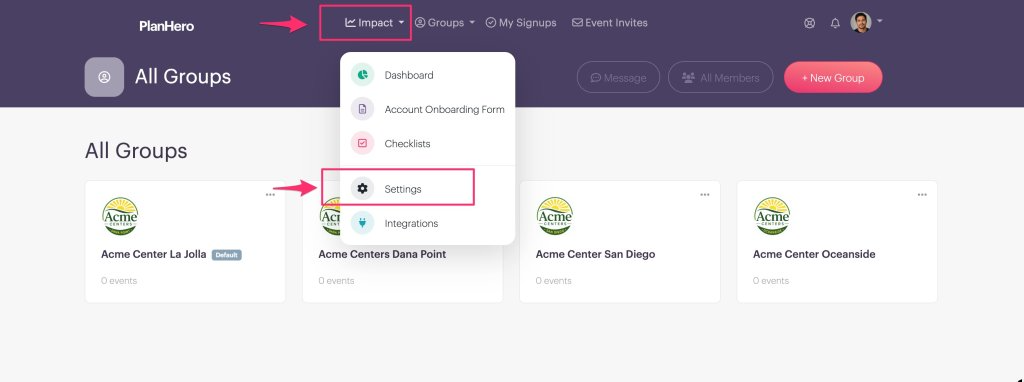
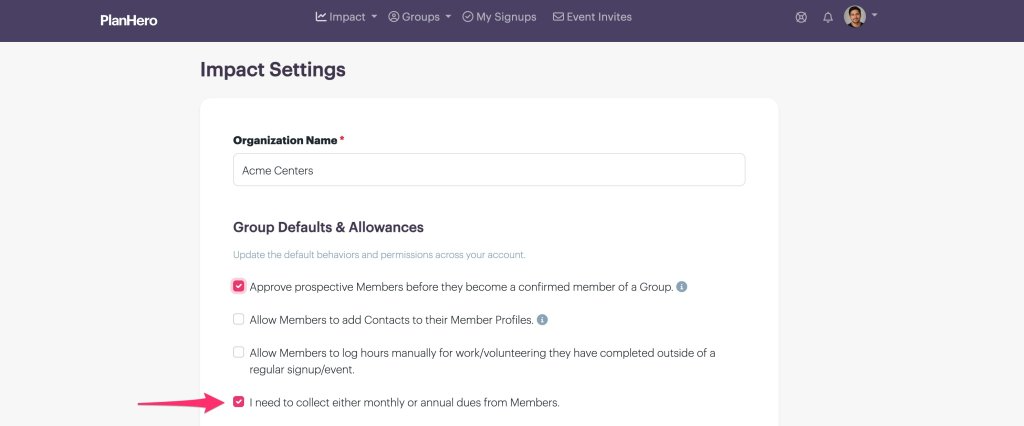
This is also where you’ll find other account-wide Impact settings, including options you selected when you originally onboarded your organization.
Find the option for collecting monthly or annual dues and enable it.
Step 2: Connect Your Stripe Account
PlanHero uses Stripe to securely process membership payments.
If your PlanHero account is not yet connected to Stripe, you’ll see a message letting you know that you need to establish the connection before you can collect dues.
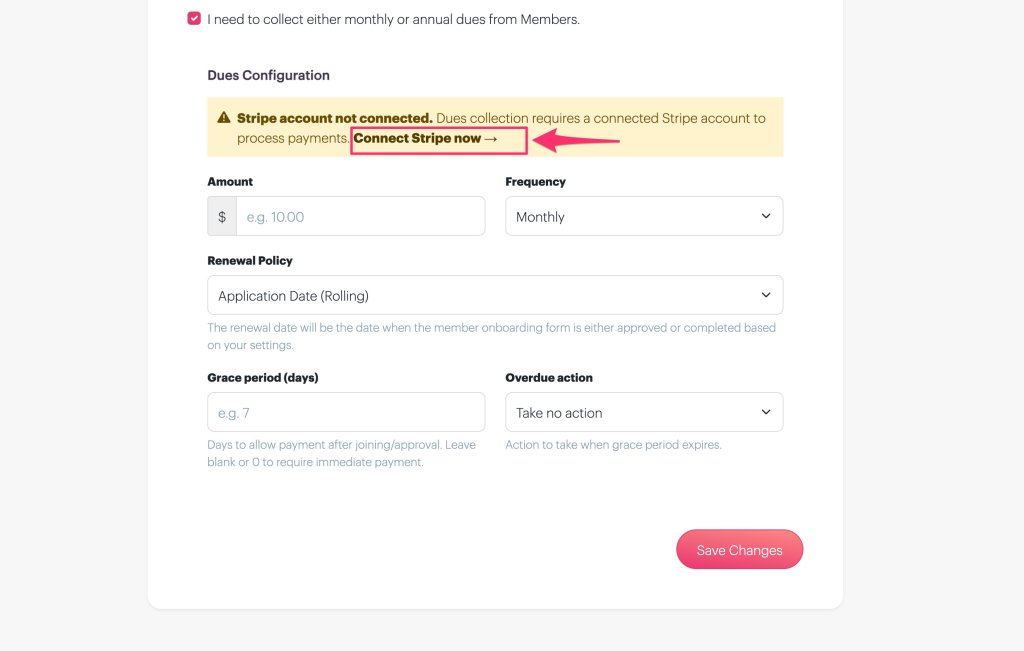
Follow the link to My Account, scroll to the Stripe section, and select Connect to Stripe.
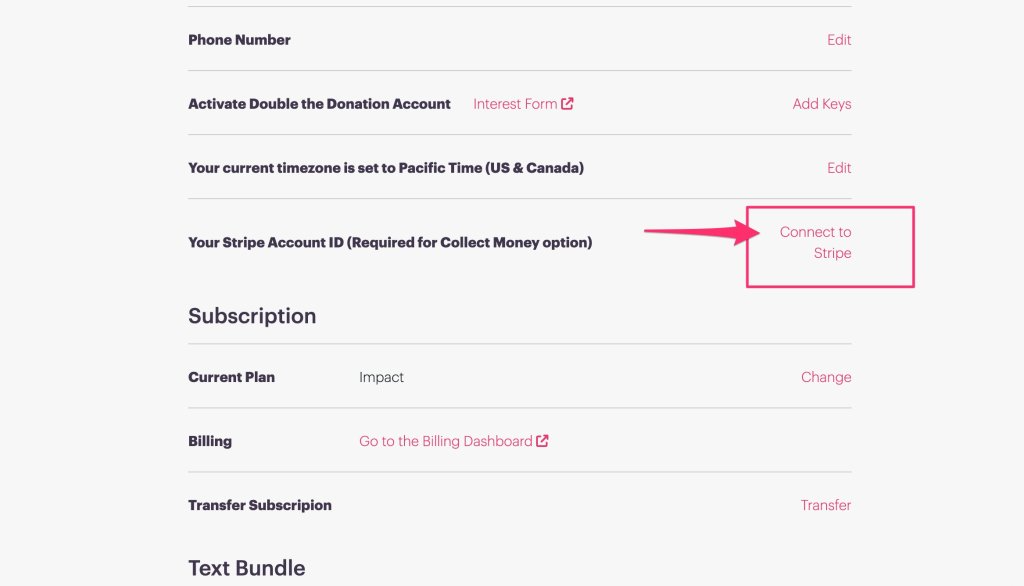
If your organization already has a Stripe account, you may be able to connect your existing account. Otherwise, Stripe will walk you through the process of setting one up.
During Stripe’s onboarding process, you’ll need to provide the information Stripe requires to establish and verify your account. Depending on how your organization is structured, this may include banking, organization, tax, and authorized-representative information.
Once your Stripe connection is complete, return to your Impact settings to finish setting up your dues.
Step 3: Set Your Dues Amount and Frequency
Next, determine how much members will pay and how frequently dues are collected.
For example, your organization might charge:
$100 annually
Or you could establish monthly dues instead.
You can also use the Dues feature for a lifetime membership, where a member makes one payment and does not have a future renewal.
Step 4: Choose Your Renewal Policy
PlanHero gives you flexibility in determining when a member’s dues renew.
You can base renewal on:
- A specific date — Everyone renews on the date you establish, such as January 1 each year.
- The application date — Each member’s renewal is based on when they originally joined.
- Lifetime membership — The membership does not renew and no additional dues are required.
Choose the option that best matches your organization’s membership policy.
Step 5: Establish a Grace Period
You can also determine how much time a member has to pay their dues.
For example, suppose your organization requires prospective members to complete an onboarding form and be approved before becoming confirmed members. You may want to give an approved member seven additional days to submit their dues.
PlanHero lets you establish the grace period that makes sense for your organization.
Step 6: Decide What Happens When Dues Aren’t Paid
Finally, determine what PlanHero should do when a member hasn’t paid by the end of the grace period.
You have three options:
- Take no action
The person’s membership status remains unchanged.
- Change the membership to Lapsed
The person becomes a non-member. To become a member again, they will need to pay the required membership dues or renewal fee.
- Suspend the membership
The person becomes a non-member and will need to complete the onboarding process again before their membership can be restored.
This gives your organization control over how strictly you want PlanHero to enforce your membership and dues policies.
Dues + Member Management in One Place
Collecting dues is even more useful when it’s connected to the rest of your member management process.
With the PlanHero Impact Plan, you can organize Members into Groups, onboard new Members, collect dues, manage waivers and agreements, upload documents, create Checklists, track participation, manage Events and signups, and more — all from one platform.
Instead of maintaining one system for members, another for volunteer activities, and another for dues, the Impact Plan helps bring those pieces together.
Because managing your people should be easier — whether they’re volunteers, members, parents, employees, or supporters.
How to Collect Membership Dues Video Tutorial